For schools
Every student gets a speaking tutor. Every teacher gets the evidence.
YNova gives each learner short daily IELTS Speaking practice with NOVA, and gives teachers a portal to assign work, review evidence by class, and mark with a draft they edit. YNova staff set the school up.
What the school gets
A tutor for every learner and a workspace for every teacher.
Learners use the same IELTS Speaking tutor as individual users. The school adds a teacher portal, rosters, and an admin workspace on top.
A tutor for every learner
Short daily sessions on Part 1, Part 2 and Part 3, scored on the four official criteria, with hints in the learner's own language, as much or as little as the learner sets.
Teacher portal with rosters and assignments
Teachers create classes, invite learners, set assignments, and see completion and practice estimates grouped by class.
Marking with a NOVA draft
For each piece of shared evidence, NOVA drafts a comment. The teacher edits it, or replaces it, and the learner sees the teacher's version. NOVA never overrides a teacher's mark.
Learner-controlled sharing
Learners decide whether their transcripts and recordings are visible to their teacher. Without that opt in, teachers see completion, not content.
School admin workspace
Administrators run their own workspace for the school, so teachers and classes are managed in one place.
Onboarding by YNova staff
We set up the school, invite your administrator, and stay on hand while the first classes go live.
The real thing
The school's own page, and a teacher's.
Screens from the product, not a design tool. The school administration page runs the four-step setup and keeps an audit ledger; the teacher portal groups every class by who needs the next action.
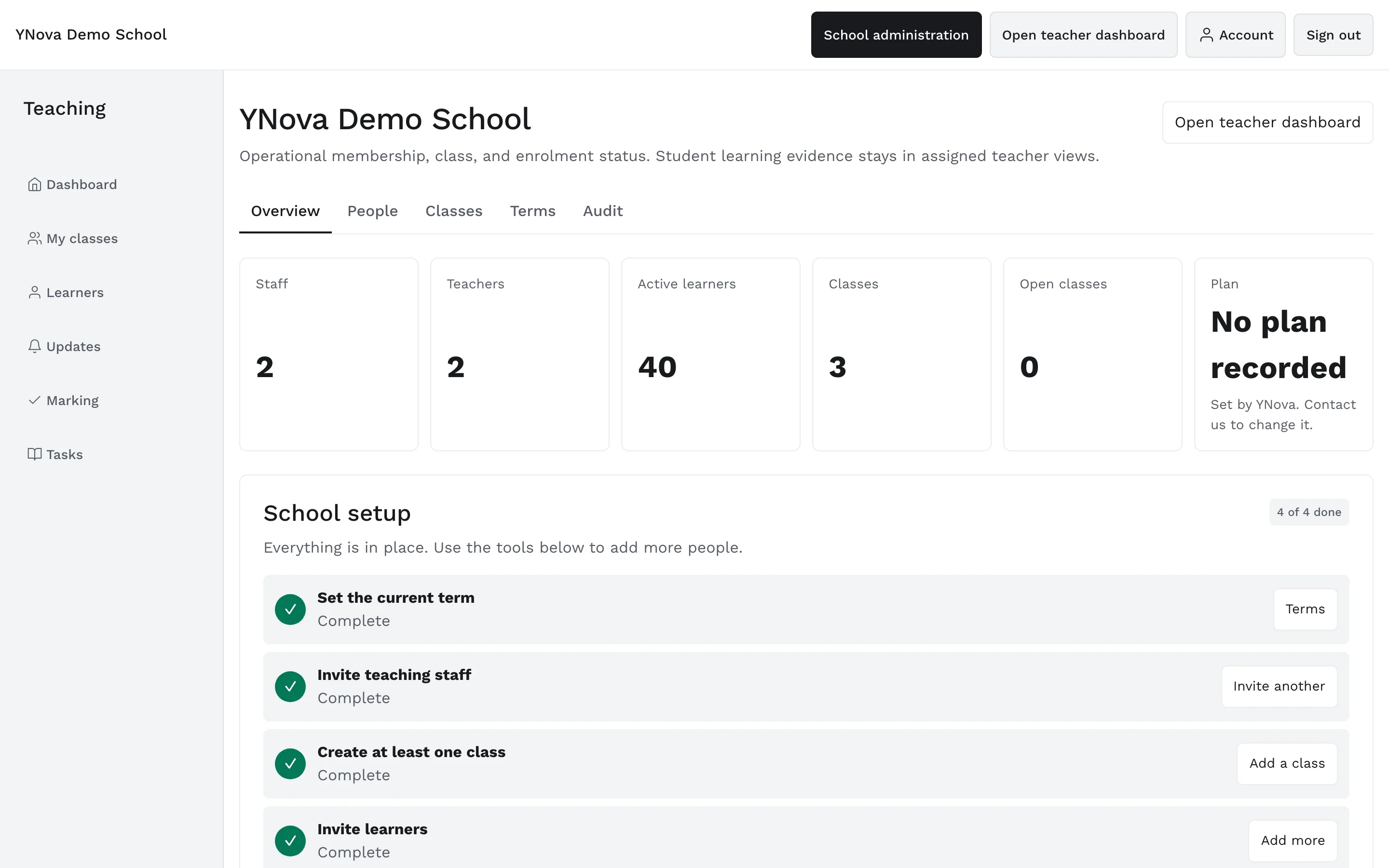
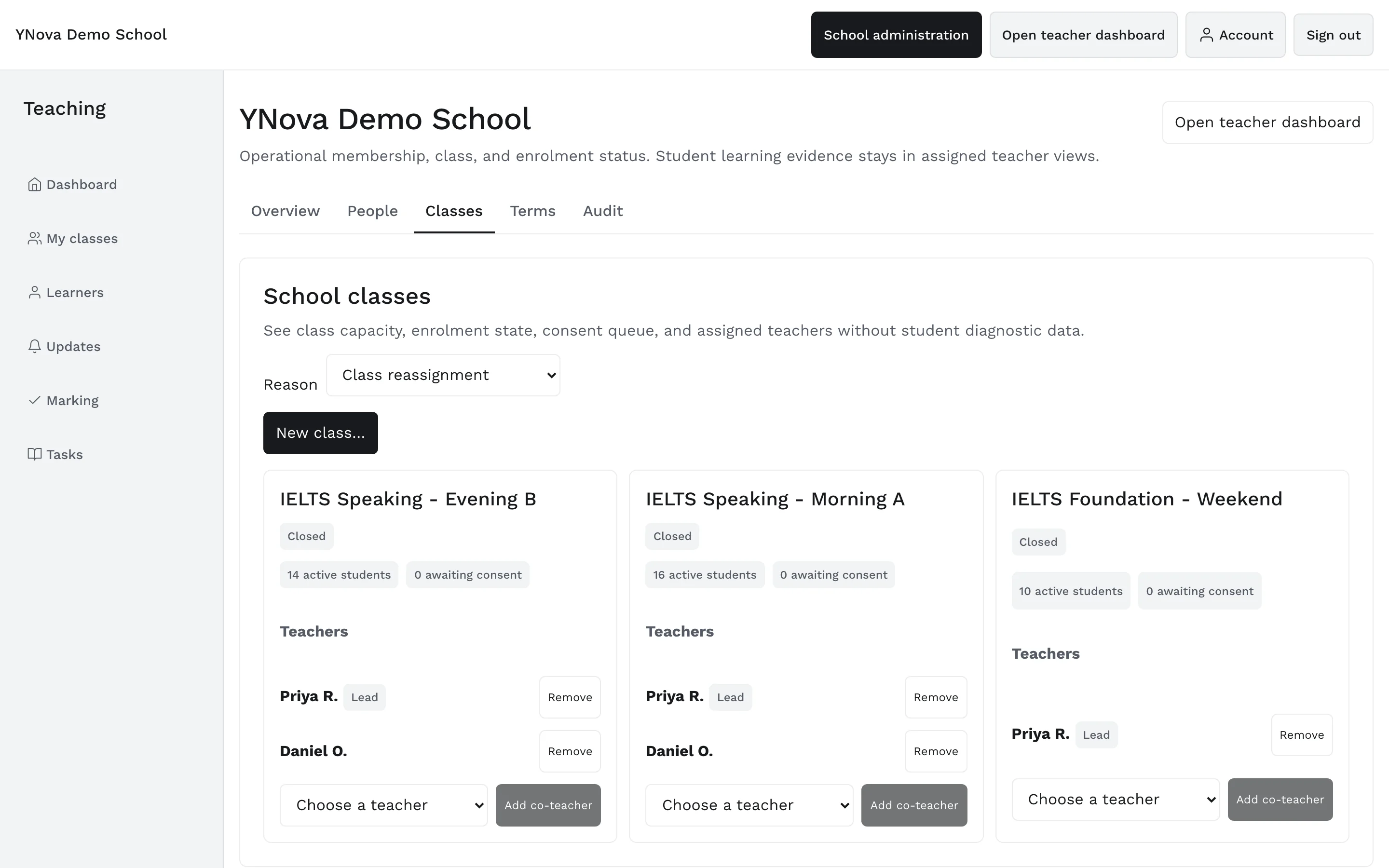
Screens from the YNova Demo School, a synthetic fixture with made-up learners. The interface is the real product.
How a pilot runs
Three steps from first email to first evidence.
A school pilot is live in New Zealand today. This is the path it followed.
We set up the school and invite your admin
YNova staff create the school workspace and send the first invitation to your administrator. No installation for anyone; the portal and the tutor run in the browser.
Teachers create classes and invite learners
Each teacher builds a roster, invites learners, and sets the first assignment: a Part 1 session, a Part 2 cue card, or a mock test by Part.
Learners practise, teachers review evidence
Learners work with NOVA on their own phones. Teachers open the class view, see who has practised, read the evidence learners consented to share when they joined, and mark it.
Privacy by default
Learners own what they say.
Speaking practice is personal. A learner who is nervous about being heard will not practise. So sharing is the learner's decision, not the school's default.
- Learners choose whether to share their transcripts and recordings with a teacher. Sharing is opt in.
- Teachers never see a learner's transcripts or recordings unless the learner has opted in.
- YNova does not sell personal information.
- Scores are practice estimates, not official IELTS results, and are labelled that way for teachers too.
Pricing
Per-seat pricing on request.
School plans include the teacher portal, class rosters and onboarding. Tell us how many learners and teachers you have and we will send a quote.
Bring YNova to your school.
Email the schools team. We will set up the workspace and walk your administrator through the first class.
Scores in the app are practice estimates, not official IELTS results.